
JOUR 73361
Coding the News
Learn how America's top news organizations escape rigid publishing systems to design beautiful data-driven stories on deadline.
Personal Portfolio
How to build a website that showcases your best work
Apr. 27, 2026
Like it or not, your online portfolio is one of the most important assignments at this stage of your career. Yes, your work should speak for itself. Ultimately, you want editors and recruiters to evaluate you based on the quality of your journalism, not your skill at self promotion.
The reality is that your web presence is the first thing many people will see when they look you up online. Building your own portfolio site is like printing a business card you can hand out to anyone who might be interested in hiring you.
And on today's web, it's much more important than a traditional business card. That's because it's one of the few levers you have to control how you're perceived and presented by artificial intelligence systems.
It can also be a useful exercise in self-reflection. Building a portfolio forces you to ask: What do I want to be known for? What work am I most proud of? This process of curation and, yes, self-branding can force you to make tough choices about how you want to craft your identity as a journalist.
Take a look at how some of our guest speakers this semester choose to present themselves online. Note what they all have in common. They clearly state who they are, what they do, and give visual examples of their work.
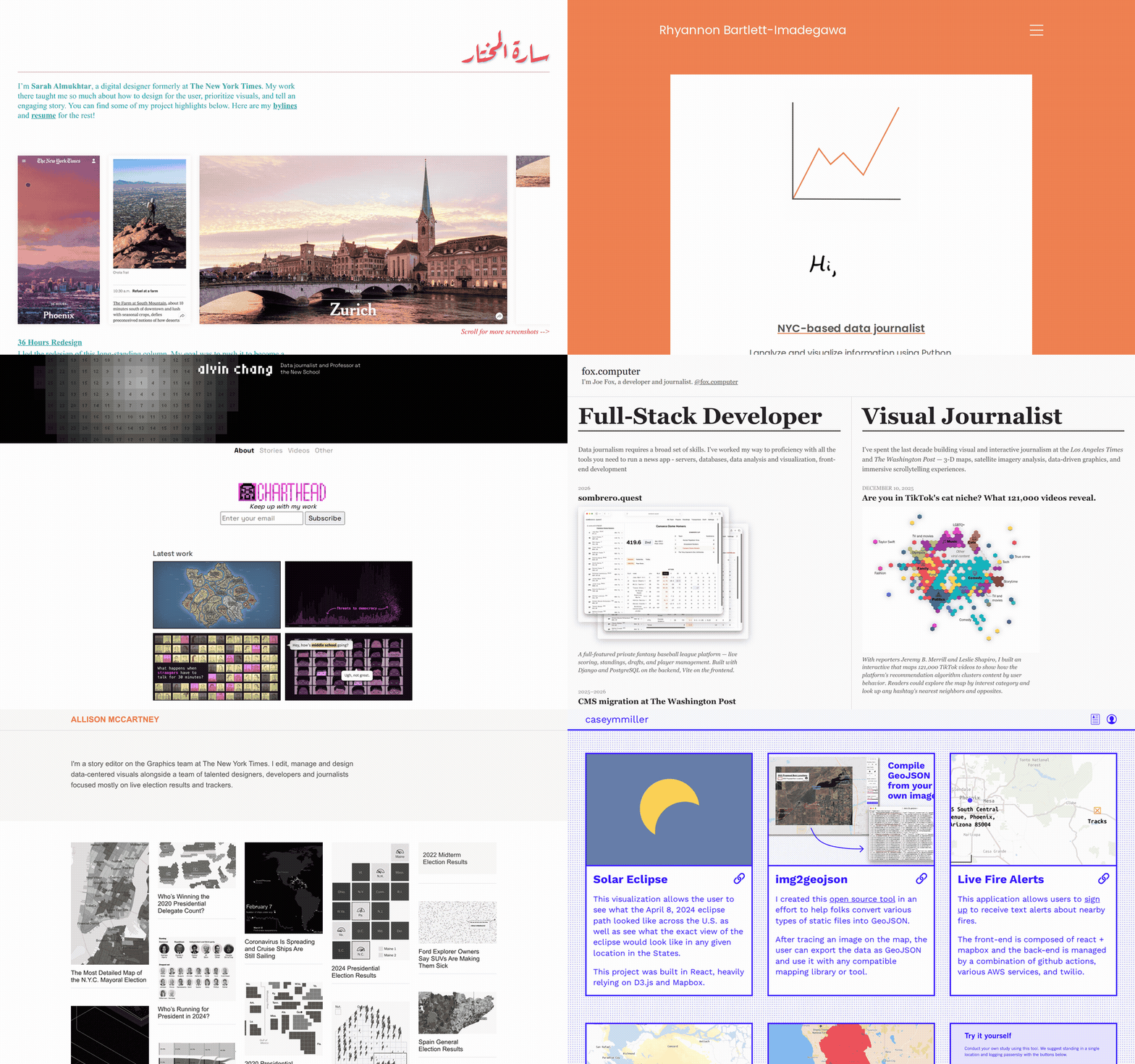
| Name | Self definition |
|---|---|
| Allison McCartney | Story editor on the Graphics team at The New York Times |
| Alvin Chang | Data journalist and Professor at the New School |
| Armand Emamdjomeh | Visual Journalist |
| Casey Miller | Turning data sets into easily understandable, engaging experiences for users |
| Joe Fox | Developer and journalist |
| Rhyannon Bartlett-Imagadegawa | NYC-based data journalist |
| Sarah Almukhtar | Digital designer formerly at The New York Times |
This week you will make a site in this same vein, a simple portfolio that clearly states who you are and what you've done. You'll use the same SvelteKit template we've been working with all semester.
Our demonstration case will be creating a portfolio for Jacob Riis, the pioneering chronicler of tenement life in late 19th-century New York.
Part 1: Creating a simple profile page
As in past weeks, open your browser and navigate to our template repository at github.com/palewire/cuny-jour-static-site-template.

Click "Use this template" and create a new repository called riis-portfolio. Clone it. Open it in Visual Studio Code.
Install the dependencies.
npm installStart the dev server.
npm run devOpen localhost:5173. You'll see the article-style demo page our template ships with — the same one we've been recycling all semester.
Open src/routes/+page.svelte. Delete everything. We're going to start from a blank slate.
Save and check your browser. The page will be blank, except for the header and footer.
We want to delete those too, so let's go into the +page.js file alongside it and set showHeader and showFooter to false:
export const load = () => {
  return {
    showHeader: false,
    showFooter: false
  };
};
Now you should have a completely blank page. This is our canvas.
As in past weeks, your class template already includes the components you need. Like the rest of the library, they're documented on the Storybook site.
In the compositions section, you can see a pre-built Portfolio page that shows how the new Profile component and the Card component we've used in past weeks work together. The example is a portfolio for Max Eastman, a controversial editor from the early 20th century who lived in Greenwich Village and published a magazine called The Masses.

Let's start by importing the Profile component and wiring it up with placeholder content, just to see it on screen.
Open src/routes/+page.svelte and paste in:
<script>
  import Profile from '$lib/components/Portfolio/Profile.svelte';
</script>

<div class="container wide">
  <Profile
    name="Lorem Ipsum"
    tagline="Data journalist focused on the human impact of government policy"
    photo="https://picsum.photos/id/103/400/500"
    photoAlt="Lorem Ipsum, in a portrait taken at the Newmark School."
    email="lorem@example.com"
    github="loremipsum"
    linkedin="loremipsum"
    bio="I'm a graduate student at the Craig Newmark Graduate School of Journalism at CUNY, focusing on using data analysis as the engine for shoeleather reporting on the issues that matter to New Yorkers.

I'm looking for a summer internship at a U.S. newsroom doing risk-taking journalism that holds power to account."
  />
</div>
Save the file and check your browser. You should see a name as a large headline, a tagline below it, a placeholder photo block and the rest of the content.

Here you see the key components of any journalist's portfolio: a clear statement of who you are and what you do, a photo, contact links and a statement of what you're doing now, and what you might be looking for next.
Part 2: Structuring your content with YAML
In a real newsroom, when we're doing things right, content and code live in separate places. You saw that in Week 10 when you built your multimedia gallery.
In that example, each slide in the story was stored in a JSON file. The Svelte code read that file, looped through the slides, and rendered them with the same template.
Today you'll try something different: YAML.
YAML is a data structuring system designed to store information in a way that is easy for people to read and write. It stands for “YAML Ain’t Markup Language” because it does not wrap data in tags like HTML or XML, a technique known as markup.
Programmers often choose YAML for configuration files because it's more forgiving than JSON and handles long-form text better.
You've actually seen YAML before. Back in Week 2, the GitHub Actions workflow file we activated was YAML. It's popular for content because it's easier to read and write than JSON — no curly braces, no commas at the end of every line, and a clean way to handle long prose.
Here is a simple example of how it stores different types of data:
# This is a comment

# This is a string
name: Alice

# This is an integer
age: 25

# This is a list
colors:
  - red
  - green
  - blue

# This is a nested object
address:
  street: 123 Main St.
  city: Anytown
  state: CA
  zip: 99999
Here's the same data in YAML versus JSON:
address:
  street: 123 Main St.
  city: Anytown
  state: CA
zip: 99999{
"address": {
"street": "123 Main St.",
"city": "Anytown",
"state": "CA",
"zip": 99999
}
}One reason we're switching to YAML is its handling of long prose. Writing multi-paragraph text inside a JSON string is miserable. Every line break has to be stored as \n\n, every quote has to be escaped.
YAML solves this with a feature called block scalars. You can put a | after the key, indent the content and write whatever you want.
Here's an example:
bio: |
  This is the first paragraph. It can be as long as you want.

  This is the second paragraph. Blank lines separate paragraphs,
  just like they would in a text file.
As in past weeks, create a new folder at src/lib/data/. Inside it, make a file called content.yaml.
We'll build it up piece by piece, adding fields only when we're ready to put them on the page. Start with just the profile, which is a single object with fields that match the properties of the Profile component:
profile:
  name: Jacob Riis
  tagline: Police reporter and tenement chronicler
  photo: photos/jacob-riis.jpg
  photoAlt: Jacob Riis, in a portrait taken around 1900.
  email: jriis@eveningsun.com
  github: jacob-riis
  linkedin: jacob-riis
  bio: |
    I'm a police reporter at Mulberry Street headquarters for the Evening Sun, lecturing each week with lantern slides drawn from the flash photography I've been making in the Lower East Side.

    I'm seeking the chance to turn this work into reform — better housing laws, better schools for the children of the poor, and the demolition of Mulberry Bend.
Now we need to get this YAML onto the page. We'll use the +page.js load function pattern we established in Week 5. Update src/routes/+page.js to import the YAML file and return it alongside the layout settings:
import content from '$lib/data/content.yaml';

export const load = () => {
  return {
    showHeader: false,
    showFooter: false,
    content,
  };
};
The YAML plugin in our template handles the import — it reads content.yaml and hands us a JavaScript object, already parsed. Because our YAML has a top-level key profile, the page can read data.content.profile without any extra unpacking.
Wiring up the Profile
Open src/routes/+page.svelte. Replace the hardcoded Profile with data from the YAML file:
<script>
  import Profile from '$lib/components/Portfolio/Profile.svelte';

  let { data } = $props();
  const content = data.content;
</script>

<div class="container wide">
  <Profile
    name={content.profile.name}
    tagline={content.profile.tagline}
    photo={content.profile.photo}
    photoAlt={content.profile.photoAlt}
    email={content.profile.email}
    github={content.profile.github}
    linkedin={content.profile.linkedin}
    bio={content.profile.bio}
  />
</div>
Save and check your browser. Riis should now appear on the page, with all the data drawn from our YAML file.

Part 3: Looping through your clips
That's a nice start, but if there's one thing that's universal about journalist portfolios, it's that they show off some work. We need to get clips on the page.
Open content.yaml and add a clips section below the profile. We will include fields that match, exactly, the inputs to our Card component.
profile:
  name: Jacob Riis
  tagline: Police reporter and tenement chronicler
  photo: photos/jacob-riis.jpg
  photoAlt: Jacob Riis, in a portrait taken around 1900.
  email: jriis@eveningsun.com
  github: jacob-riis
  linkedin: jacob-riis
  bio: |
    I'm a police reporter at Mulberry Street headquarters for the Evening Sun, lecturing each week with lantern slides drawn from the flash photography I've been making in the Lower East Side.

    I'm seeking the chance to turn this work into reform — better housing laws, better schools for the children of the poor, and the demolition of Mulberry Bend.
clips:
  - slug: police
    title: Police Headquarters Reporter
    image: /photos/police.jpg
    imageAlt: Mulberry Street police headquarters in the late 1880s
    description: A decade of police-beat reporting at 300 Mulberry Street for the New-York Tribune and the Evening Sun.

  - slug: how-the-other-half
    title: How the Other Half Lives
    image: /photos/bandits-roost.jpg
    imageAlt: Bandit's Roost, a Riis photograph of an alley off Mulberry Street, 1888
    description: A book-length investigation of New York tenement life, illustrated with my own flash photographs of the city after dark.

  - slug: mulberry-bend
    title: The Battle for Mulberry Bend
    image: /photos/mulberry-bend.jpg
    imageAlt: Mulberry Bend before demolition, photographed in the early 1890s
    description: A sustained crusade to demolish Mulberry Bend, the most notorious slum block in lower Manhattan, and replace it with a public park.
The images have already been added to the static folder in the template. The slug field is a unique identifier you'll use later.
Open src/routes/+page.svelte. Import the Card component and add the grid below the Profile. Use the base variable to construct the links to the detail pages, which we'll get to later.
<script>
  import Profile from '$lib/components/Portfolio/Profile.svelte';
  import Card from '$lib/components/Data/Card.svelte';
  import CardGrid from '$lib/components/Data/CardGrid.svelte';
  import { base } from '$app/paths';

  let { data } = $props();
  const content = data.content;
</script>

<div class="container wide">
  <Profile
    name={content.profile.name}
    tagline={content.profile.tagline}
    photo={content.profile.photo}
    photoAlt={content.profile.photoAlt}
    email={content.profile.email}
    github={content.profile.github}
    linkedin={content.profile.linkedin}
    bio={content.profile.bio}
  />

  <CardGrid>
    {#each content.clips as clip (clip.title)}
      <Card
        href="{base}/clips/{clip.slug}"
        image={clip.image}
        imageAlt={clip.title}
      >
        <h3>{clip.title}</h3>
        <p>{clip.description}</p>
      </Card>
    {/each}
  </CardGrid>
</div>
Save and check your browser. The Riis profile should appear up top, with three clip cards in a grid below it.

Want to add a fourth clip? Add a fourth entry to the list. Nothing about your Svelte code needs to change. That's the beauty of this approach.
Part 4: Templating a detail page for every clip
Alright. We've got a homepage. But try clicking into one of the cards. You get a 404. We need to fix that by creating a dedicated page for each clip.
You've seen this pattern before. Back in Week 9, when we built the Bronx Housing Violations database explorer, every building had its own page at /building/[id].
You did this by creating one dynamic route — a folder named [id] in square brackets — and SvelteKit ran a load function to find the matching record.
Today, you're going to do the same thing using our YAML file and its slug field as the unique identifier.
Create a new folder at src/routes/clips/[slug]/. Then add +page.js inside it with the following code:
import content from '$lib/data/content.yaml';

export const load = ({ params }) => {
  const clip = content.clips.find((c) => c.slug === params.slug);

  return {
    showHeader: false,
    showFooter: false,
    profile: content.profile,
    clip,
  };
};
This load function reads the slug from the URL, looks up the matching clip in the YAML file, and returns it alongside the profile.
It's time to make the page. Open src/routes/clips/[slug]/+page.svelte and paste in this bare-bones template, which uses the same components we've been using all semester:
<script>
  import Kicker from '$lib/components/Article/Kicker.svelte';
  import Headline from '$lib/components/Article/Headline.svelte';
  import Image from '$lib/components/Media/Image.svelte';
  import { base } from '$app/paths';

  let { data } = $props();
</script>

<div class="container">
  <Kicker text="{data.profile.name}'s Portfolio" href="{base}/" />
  <Headline text={data.clip.title} />

  <Image src={data.clip.image} alt={data.clip.title} />

  <p>{data.clip.description}</p>
</div>
Save and click into one of the cards on your homepage. You should see something like this.

That's nice but you can do better. On a personal portfolio site, you should try to say more about each project than just a one-paragraph description. You want to give visitors a sense of what you did, what you learned, and why it matters.
Like the rest of the content, it should be structured in the YAML file. Open content.yaml and add three new fields to each clip: url, skills, and body. They'll provide a link to the original work, a list of skills you demonstrated on the project and a longer-form description.
clips:
  - slug: police
    title: Police Headquarters Reporter
    image: /photos/police.jpg
    imageAlt: Mulberry Street police headquarters in the late 1880s
    description: A decade of police-beat reporting at 300 Mulberry Street for the New-York Tribune and the Evening Sun, covering crime, immigration, and the daily life of the Lower East Side.
    url: https://www.loc.gov/collections/jacob-riis/
    skills:
      - Police reporting
      - Source building
      - Public records
      - Breaking news
    body: |
      The police beat is where I learned the city. Mulberry Street headquarters sits on the edge of the worst tenements in New York, and every story I covered as a reporter — every arrest, every fire, every dead body — pulled me deeper into the lives of the people on the other side of the door.

      I didn't yet know I would write a book about what I was seeing. But I was learning the geography, the families, and the patterns. The reform work that came later would have been impossible without the reporting work that came first.

  - slug: how-the-other-half
    title: How the Other Half Lives
    image: /photos/bandits-roost.jpg
    imageAlt: Bandit's Roost, a Riis photograph of an alley off Mulberry Street, 1888
    description: A book-length investigation of New York tenement life, illustrated with my own flash photographs of the city after dark. Published by Charles Scribner's Sons in 1890.
    url: https://www.loc.gov/item/06017839/
    skills:
      - Flash photography
      - Long-form writing
      - Public speaking
      - Documentary
    body: |
      The flash powder gave me the picture, but the picture is only half the work. The other half is the words — telling readers in the brownstones uptown what the inside of a Five Points tenement smells like, sounds like, who lives there and how they came to be there.

      The book sold well enough that even Theodore Roosevelt came to find me. He left a note on my door saying he had read the book and had come to help. That was the moment I understood what reporting could do.

  - slug: mulberry-bend
    title: The Battle for Mulberry Bend
    image: /photos/mulberry-bend.jpg
    imageAlt: Mulberry Bend before demolition, photographed in the early 1890s
    description: A sustained reporting and advocacy effort to demolish Mulberry Bend, the most notorious slum block in lower Manhattan, and replace it with a public park. The block came down in 1894. Columbus Park stands there today.
    url: https://www.mcny.org/
    skills:
      - Accountability reporting
      - Government affairs
      - Advocacy
      - Photography
    body: |
      The Bend was three acres of the foulest tenement block in the city — narrow alleys where the sun never reached, buildings that should have been condemned a generation earlier, and a death rate among the children many times higher than the city average.

      I wrote about it for years. I photographed it. I lectured on it. Reform is slow. The Bend went from a block I first reported on as a young man to a public park nearly twenty years later.
Notice the multiline body fields at work. That's the payoff for using YAML block scalars.
Now update src/routes/clips/[slug]/+page.svelte to use the new fields. Pull out a couple more components from the library to help with the layout: Rule for horizontal dividers, TagList for the skills and project link, and your old friend ArticleBody to wrap the prose.
<script>
  import Kicker from '$lib/components/Article/Kicker.svelte';
  import Headline from '$lib/components/Article/Headline.svelte';
  import Image from '$lib/components/Media/Image.svelte';
  import Rule from '$lib/components/Layout/Rule.svelte';
  import TagList from '$lib/components/Data/TagList.svelte';
  import ArticleBody from '$lib/components/Article/ArticleBody.svelte';
  import { base } from '$app/paths';

  let { data } = $props();
</script>

<div class="container">
  <Kicker text="{data.profile.name}'s Portfolio" href="{base}/" />
  <Headline text={data.clip.title} />

  <Image src={data.clip.image} alt={data.clip.title} />

  <Rule />
  <TagList label="Skills" tags={data.clip.skills} />
  <TagList
    label="View Project"
    tags={[{ text: new URL(data.clip.url).hostname, href: data.clip.url }]}
  />
  <Rule />

  <ArticleBody>
    {#each data.clip.body.trim().split('\n\n') as paragraph, i (i)}
      <p>{paragraph}</p>
    {/each}
  </ArticleBody>
</div>
Save and check your browser. You should see a full detail page.

Click the kicker or use your browser's back button to return to the homepage. Click into another clip. Same template components, different content. Congratulations, you've built a portfolio site that could extend to as many clips as you want, all powered by a single YAML file.
Homework
Tonight you built Riis's portfolio with me. Now you'll build one of your own.
Task 1: Build a portfolio site
Use our base template to build a portfolio site. You can choose to build it for yourself or for a historic journalist. There should be:
- A profile section with a name, tagline, photo, contact links, and a statement of purpose
- A grid of at least three clips, each with a title, description, and image
- A detail page for each clip with a longer description, a list of skills demonstrated, and a link to the original work
- At least one YAML component structuring the content that varies from how we structured Riis's content
- At least one design flourish that goes beyond the basic template
Task 2: Prepare to present
Be ready to walk the class through your portfolio. You should be prepared to:
- Share the homepage and detail page of at least one clip
- Discuss how you decided to frame your portfolio's identity and message
- Explain one change you made to how the data is structured
- Explain one design choice you made and why
Task 3: Outline your final project
You will also be expected to present your plans for your final project. You should have answers prepared for the following questions, which you will share with the class.
- What is the central question of your project?
- What data or other assets are you going to use to tell the story?
- Who do you imagine as the audience?
- What will the audience be able to discover that they couldn't from a traditional text article?
- What will the main interactive or visual element be?
- How will Svelte's reactive capabilities enhance the project?
- What Svelte components will you use?